


Tax codes can be quite confusing and are often wrong – it is estimated that around 40% of taxpayers are on an incorrect tax code with around 75% of these overpaying tax. You can find out more about tax codes here.
This is the Medics’ Money Guide to checking what your tax code shows and how to change it if it is wrong because HMRC have the wrong information.
Table of Contents
Checking your Tax Code
If you are here, we are assuming that you already have a Personal Tax Account. If you do not please go here to set one up:
https://www.gov.uk/log-in-register-hmrc-online-services
This document shows you how to check your tax code on your Personal Tax Account and how to request that HMRC change it if you believe that your tax code is wrong. Note that there are many reasons why someone may want to request a change to their tax code – this guide considers a number of these including where a healthcare professional is receiving an incorrect personal allowance because they currently have an “emergency tax code”. To start, log onto your Personal Tax Account then follow the steps below.
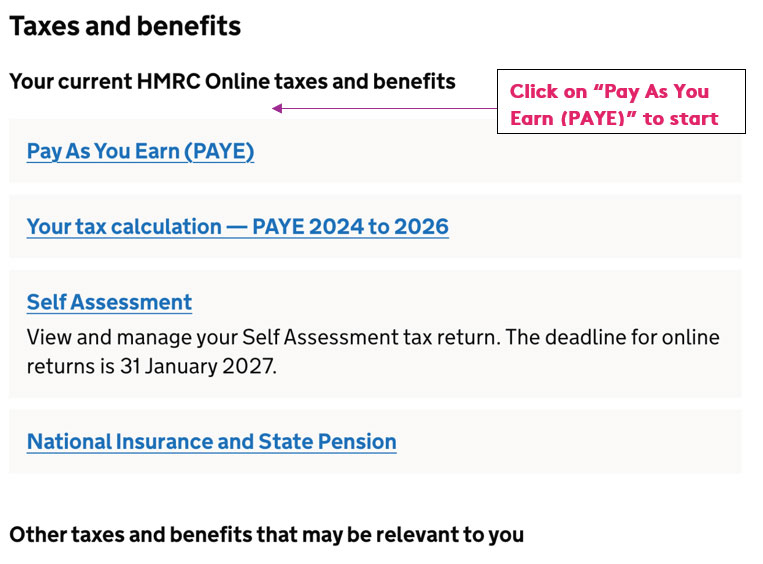
Step 1
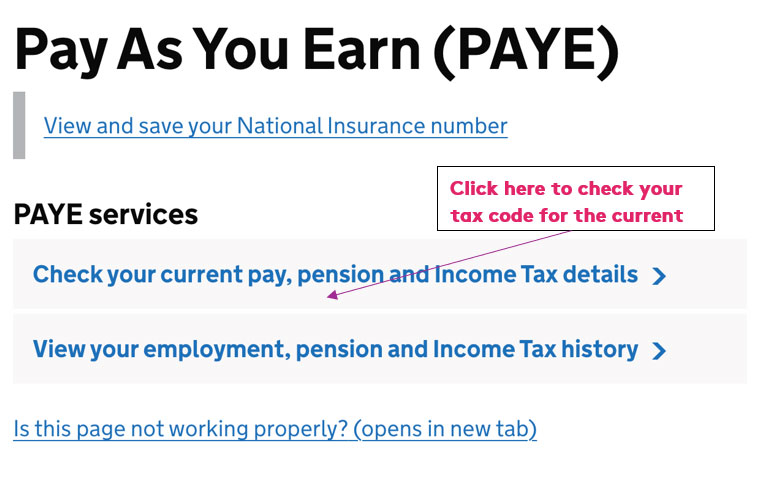
Step 2
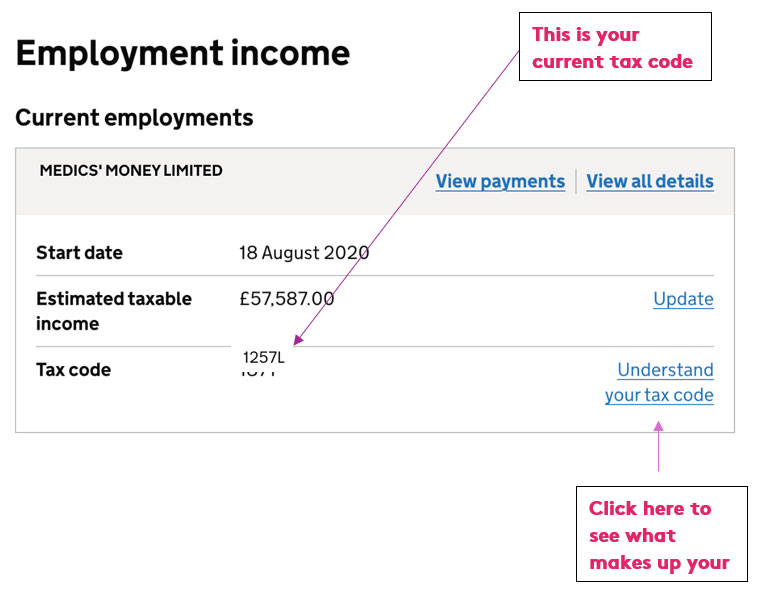
Step 3
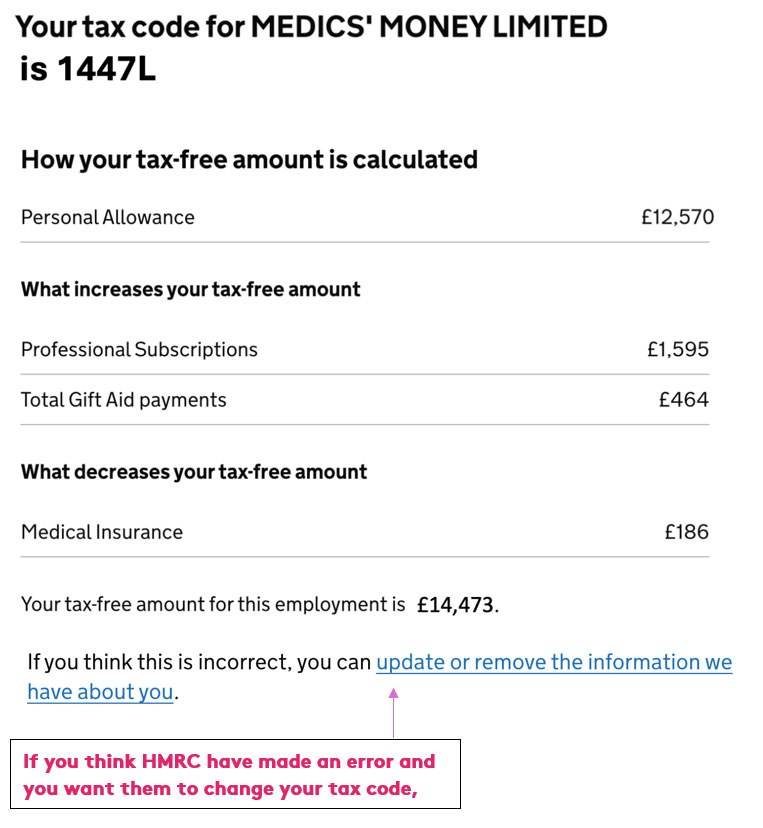
Step 4
Changing your tax code
In what ways can you change your tax code? You can ask HMRC to remove expenses that you are no longer paying, advise them of charitable donations and advise them of other income that is taxable but which does not currently have tax removed among other things.
If you click the “update or remove the information we have about you” there are four main things you can change (we will cover emergency tax codes further on):

1. Add a missing allowance or tax relief
Clicking on this link gives three allowances you can change. Most importantly you can use this link to tell HMRC if you no longer have an employment expense that you were previously claiming. So if you have cancelled a professional subscription because you no longer require it you can click this link and then “employment expense” and then the relevant tax year and the type of expense ie. “Professional fees and subscriptions”. Next you can select the “I no longer pay for this employment expense option.”

It will then ask you to enter the date when you stopped paying the expense and for your phone number so they can contact you regarding the application.
You can also tell them that the cost of an expense has changed BUT only if it has decreased.

If the cost has gone down and you select this they will then ask for further details such as how much you told them it cost and how much it will actually cost.
Note that you cannot use this method to tell HMRC about a new expense you are now paying nor can you tell them that a cost has increased (if you select the option “The cost has gone up” it will say “You need to use a different form. You cannot use this form to tell us that the cost of an employment expense is higher than the original amount you reported.”)
If you do have new professional subscriptions, or they have increased in price, you need to submit a new claim – to do this you can use our free Medics’ Money tax rebate guide:
https://medicsmoney.co.uk/free-guide/
You can also use this link to tell HMRC about Gift Aid donations you have made in the current tax year so that they can give you tax relief for this (if you are a UK higher rate taxpayer and donations are less than £10,000). You’ll need the specific details of the donation such as the name of the charity(ies), the date of donation and the amount(s) donated.
Of perhaps less significance for healthcare professionals, you can also tell HMRC if you are entitled to the Blind Person’s Personal Allowance, an extra amount of tax-free income for those who are registered blind.
2. Add income from another source
If you have other income included in your tax code that is incorrect, or you have other income that you would like included (and hence taxed this way) then you can click on this link. You can tell HMRC if you have other income that is incorrect, missing or that has ended. This would be for income not currently taxed, or undertaxed, and HMRC include examples such as casual earnings, profits from property (which is confusing given most people with rental properties would be under the self-assessment regime…) and “non-coded income” which would include income such as dividends (though these are also taken into account if you select option 3).
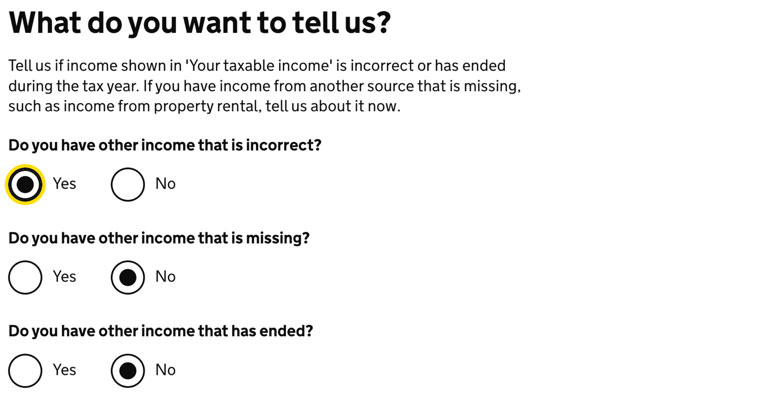
If any of this is relevant, select that option (put “No” in the other boxes) and then answer the questions that follow including the source of income that is relevant and the final amount in the tax year you selected.
3. Add investment income
If you are receiving investment income that is not being taxed, you can tell HMRC and get them to include it in your tax code and tax it through the PAYE system. You can do this for the current tax year or the previous one. Examples would include dividends exceeding £500 and untaxed bank interest exceeding your Personal Savings Allowance (£1,000 for basic rate taxpayers, £500 for higher rate taxpayers and £0 for additional higher rate taxpayers). You can also tell HMRC if you are no longer receiving investment income, eg if you have sold shares and no longer receive dividends.
You can see below a screenshot of the types of investment income that HMRC are interested in:

Don’t forget any investment income earned in an ISA is not taxable so would not need to be mentioned.
The questions that are asked next depend on what you select (e.g. if you tell them you have started to receive dividends they will ask when you started to receive the dividends, how much you expect to receive in the tax year and if any tax has already been paid)
4. Add a company benefit
You can click this if you are given a benefit in kind from a company and it is missing or has ended. These would include private medical insurance or company cars for example. Usually, if you are provided with a company benefit through your trust or GP surgery, the company will notify HMRC so it is unlikely you would need to use this link.
Changing an Emergency Tax Code if you have moved Trusts
You will be aware of these emergency tax codes from our tax code blog (ADD LINK) – there are a few of these but often Doctors will see codes BR (which takes away your personal allowance and taxes everything at 20%) and D0 (which does the same but applies a 40% tax rate). Sometimes it is appropriate to have an emergency tax code. For example, imagine I am a 40% taxpayer and I locum, then if the locum employer applies a 40% tax code then this is fine as I will be paying tax on my additional locum income at 40% (and my personal allowance will be used up on my main salary).
But as doctors it is not uncommon to move trusts in August and this can confuse HMRC into thinking that the doctor has two jobs rather than moving from one to another. You will receive two pay slips in August from the old trust and the new trust and HMRC will receive two lots of PAYE tax from two sources. This then has a knock-on effect in September onwards as HMRC will apply an emergency tax code to your new trust salary, assuming that the two pay slips will continue forever. So you may find that your net pay goes down considerably in September compared to August if they do this.
If you note that HMRC are applying an emergency tax code on your main employer pay slip you need to let them know about their error. You can call them on 0300 200 3300 but you should be able to also let them know through your Personal Tax Account if you have ended one job and started another.
To do this, go to the PAYE section on the home page and then to “Check your current pay, pension and income tax details”. You should then see your current employments. If you scroll down you will see a section called “manage employment details”

It is here that you can tell them that an employment has ended. Note that you cannot do this until it has been at least 42 days since your employment has ended and you will need your P45 from the old employer. In the ideal world, given HMRC will also receive a copy of the P45, you wouldn’t have to do this but I know from experience things are unlikely to change unless you do. From the P45 you should be avble to find everything you need (the date you left, your tax code when you left and the total pay and tax) for HMRC to then change your new employment tax code to the correct one.
Note you can also add a missing employment if this happens (I once went onto my Personal Tax Account to find that HMRC had removed my salaried GP job even though I had worked for them for years and still do!!).
Changing your income from a second, or more, job
Another mistake that HMRC sometimes make is to assume that you will get a much higher income from other jobs such as locum posts. They receive notification of pay, and PAYE, in a month and may assume that this will continue at that rate leading to a high estimated taxable income which can then have a knock on effect on your tax code (eg because they now think your adjusted exceeds £100,000 and that you will lose your personal allowance). So for example if you locum more than usual in April and earn £3,000, HMRC may then assume you will get the same amount every month over the tax year and earn £36,000 which may be way off the actual mark.
If this happens you can tell them that your estimated taxable income from that job will be lower than they have included on your personal tax account.
To do this, go to the PAYE section on the home page and then to “Check your current pay, pension and income tax details”. You should then see your current employments.
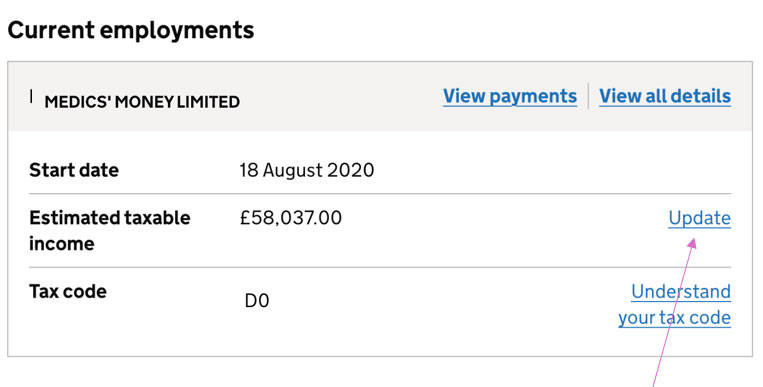
Find the employment that has a higher estimated taxable income and click on the “Update” vnext to HMRC’s estimated taxable income for that employment. You can then tell HMRC what the actual figure will likely be.
You can find what your actual taxable income to date is by looking at your last pay slip from that employer and finding the “taxable pay year to date” figure – admittedly you will have to provide your own estimate (or provide a monthly amount which HMRC will then use to estimate to the end of the tax year) but you will likely have a better steer then HMRC!
Finally
If you do contact HMRC to let them know you have made a change you should be asked to provide further contact details in case they want to get hold of you to discuss your case further. You will then get a submission receipt with a reference number and hopefully they will change your tax code quite quickly – they say up to 15 days (when I recently asked for my code to be changed it only took two days!)


